Micral P2 - Part 3 - Disk Analysis
Analyzing a CP/M boot disk
The amazing Jeff (HxC2001) managed to get a dump of the damaged CP/M 2.2 system disk for the Micral P2. As this is the only dump online, no data exist about how to read the disk. In this article, I will document my process for extracting data from this disk.
I’m starting with an IMD disk image, made via the Pauline tool. IMD is the
file format for ImageDisk by Dave Dunfield, but any other format would work:
TD0 (Teledisk), HFE (HxC), etc.
When refering to tracks and sector, I’ll use the CX HY SZ notation, which stands
for Cylinder X (= Track), Head Y (= Side), Sector Z.
Note that cylinders and sides numbering start at zero, but sectors start at 1.
For a quick primer on CP/M file formats, I recommend reading the cpmtools manual page, available online here: https://linux.die.net/man/5/cpm
Geometry
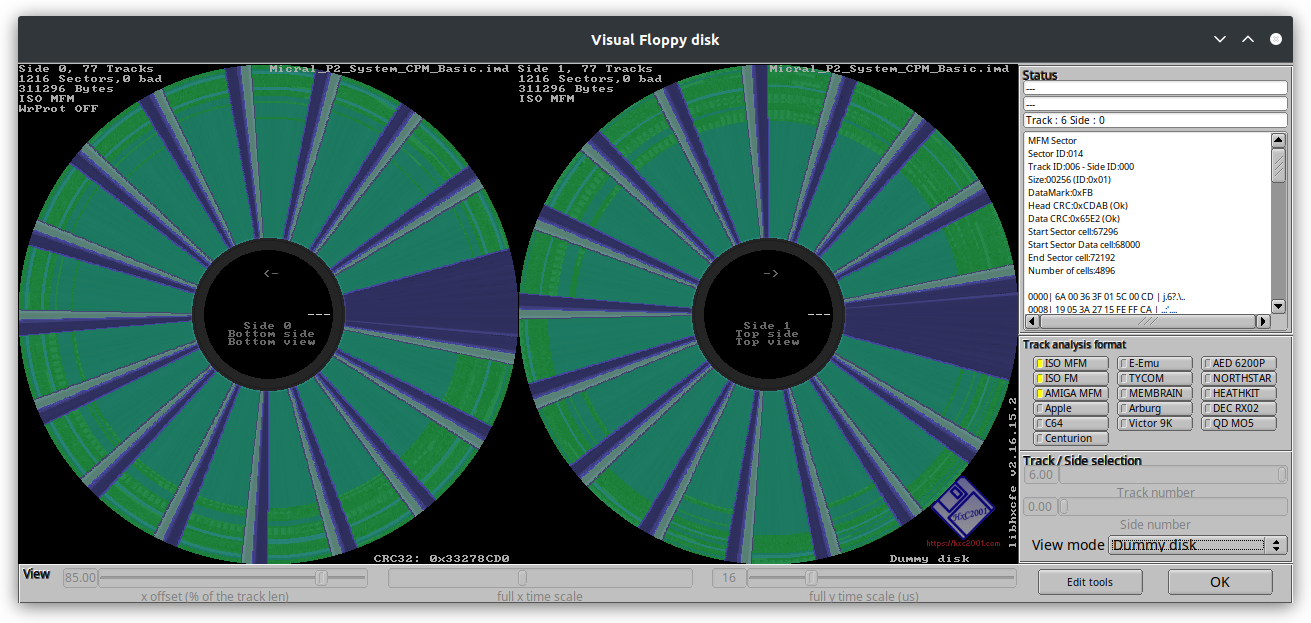
By opening the file in HxC, I can quickly get the following info:
- 2 sides
- 76 tracks per side (the 77th in the dump has no sectors)
- 16 sectors per track
- 256 bytes per sector
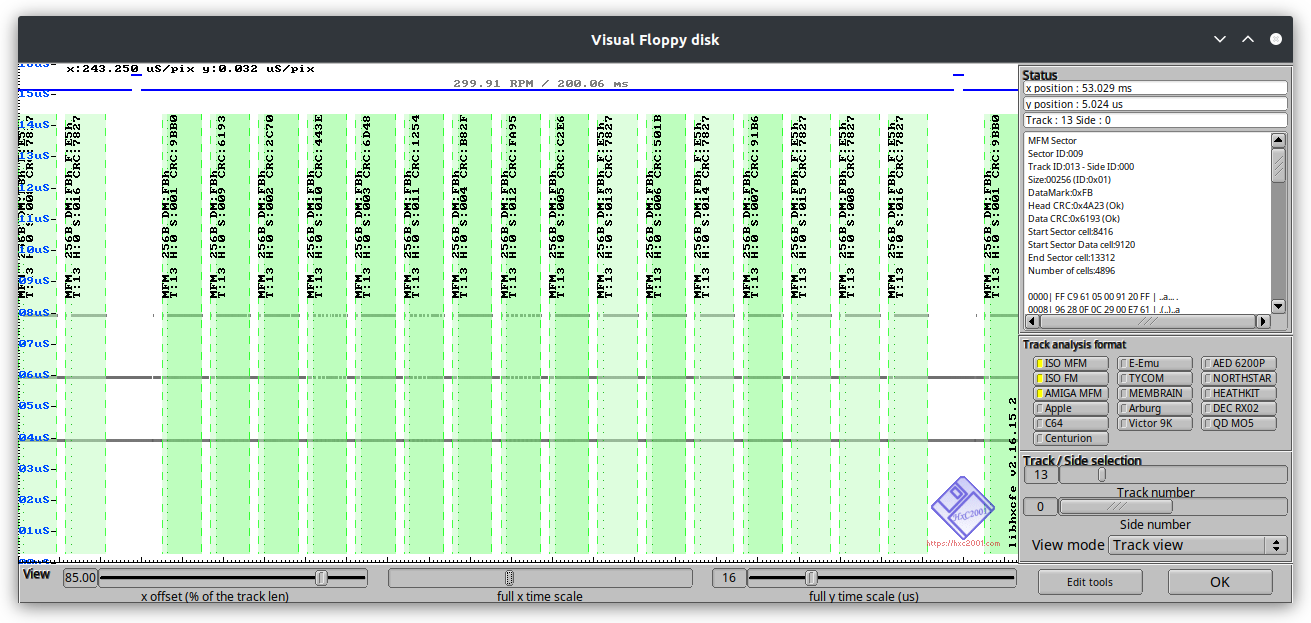
By going in the sectors view, we can also see the sector numbering is not consecutive but ordered with 1 sector between each consecutive one, so 1->9->2->10->3…:
- Interleave factor: 1
Although there’s a skew factor on the physical sector headers (visible in sector header numbering), it might be used by the BIOS only and the OS doesn’t know about it. This can be tested through trial and errors, or checked by reading the DPB (Disk Parameter Block) contained in the BIOS.
Looking back at the disk view, we see the disk only has data on the outside and
on both heads, which means it’s filled in the CHS order. Some machines fills the
first side entirely before filling the second one, but this is not the case here.
For reference, this filling order corresponds to the ORDER parameters in 22DISK,
and is not implemented in cpmtools.
CP/M attributes
Now that I know the disk is filled in CHS order, I’ll look for the superblock. The start of the disk contains CP/M in the first few tracks, which is followed by the superblock. It contains the list of files as well as their attributes and location on the disk.
C0H0, C0H1 and C1H0 are full of data.
Starting with C1H1S1, we start to see legible filenames.
Then from the end of C1H1S8 to C2H0S16, it’s filled with 0xE5, which is the
default value for empty superblock entries.
After this, we get data again starting from C2H1. So we have a superblock spanning 2 full tracks.
From this, we can infer:
- 3 tracks are reserved for CP/M
- Max directory entry is 256
- 2 tracks * 16 sectors * 256 bytes = 8192. An entry is 32 bytes, so we have at most 8192/32 = 256 entries.
Now, we just need one last CP/M attribute which is the block size. Files will be divided in chunks of that block size. Since the superblock occupies the first few blocks, we can guess the block size from the first block used on the disk, and dividing the superblock size by that amount.
To dump the superblock, I’ll convert the disk image to .IMG, which contains the contents of all the sectors in CHS order. I do it through the HxC software, by either using the graphical interface to load the .IMD file and export it as .IMG, or with the following command line:
/hxcfe -finput:"Micral_P2_System_CPM_Basic.imd" -conv:RAW_LOADER -foutput:"Micral_P2_System_CPM_Basic.img"
Now I’ll print the superblock in hexadecimal (starting at 0x3000 to skip the
first 3 tracks. 0x3000 = 3 * 16 * 256), and filter empty entries starting with 0xE5.
xxd -s 0x3000 -c 32 -l 0x2000 Micral_P2_System_CPM_Basic.img | grep -v ": e5"

00003000: 0044 554d 5020 2020 2043 4f4d 0000 0004 0400 0000 0000 0000 0000 0000 0000 0000  .DUMP    COM....................
00003020: 0046 5032 2020 2020 2043 4f4d 0000 0042 0500 0600 0700 2300 2400 0000 0000 0000  .FP2     COM...B......#.$.......
00003040: 004d 4f56 4350 4d20 2043 4f4d 0000 004c 0800 0900 0a00 0b00 0c00 0000 0000 0000  .MOVCPM  COM...L................
00003060: 0053 5542 4d49 5420 2043 4f4d 0000 000a 0d00 0000 0000 0000 0000 0000 0000 0000  .SUBMIT  COM....................
00003080: 0050 4950 2020 2020 2043 4f4d 0000 003a 0e00 0f00 1000 1100 0000 0000 0000 0000  .PIP     COM...:................
000030a0: 0053 5441 5420 2020 2043 4f4d 0000 0029 1200 1300 1400 0000 0000 0000 0000 0000  .STAT    COM...)................
000030c0: 0053 5953 4750 3220 2043 4f4d 0000 000d 1500 0000 0000 0000 0000 0000 0000 0000  .SYSGP2  COM....................
000030e0: 0045 4420 2020 2020 2043 4f4d 0000 0034 1600 1700 1800 1900 0000 0000 0000 0000  .ED      COM...4................
00003100: 004c 4f41 4420 2020 2043 4f4d 0000 000e 1a00 0000 0000 0000 0000 0000 0000 0000  .LOAD    COM....................
00003120: 0044 4454 2020 2020 2043 4f4d 0000 0026 1b00 1c00 1d00 0000 0000 0000 0000 0000  .DDT     COM...&................
00003140: 0044 4454 2020 2020 2043 4810 7fff ffc8 cfff ce40 1100 0000 0000 0000 0000 0000  .DDT     CH........@............
00003160: 0021 20a2 090e 27e7 e410 d3d3 1fff ffcf f31f f27f f21f f23f f21f f0ff f09f f140  .! ...'................?.......@
00003180: 0008 4828 8243 89f9 f904 c101 040b fffe 0603 fe30 00b4 00a3 ffff ffff ffff ffff  ..H(.C.............0............
000031a0: fffe 7060 1079 0044 9ea0 393c 5300 0000 072f 0000 0000 0000 0000 0000 0000 0000  ..p`.y.D..9<S..../..............
000031c0: 0000 7888 b640 c45c 8808 1090 54cf ffff fe71 ffff ffff ffff ffff ffff ffff ffff  ..x..@.\....T....q..............
000031e0: ffff e700 2834 8524 fcfc f9c9 e098 0000 0021 8bff ffff ffff ffff ffff ffff ffff  ....(4.$.........!..............
00003200: 0050 4552 4945 5231 2042 4153 0000 0002 2f00 0000 0000 0000 0000 0000 0000 0000  .PERIER1 BAS..../...............
00003220: 0050 4552 4945 5232 2042 4153 0000 0001 3000 0000 0000 0000 0000 0000 0000 0000  .PERIER2 BAS....0...............
00003240: 0050 4552 4945 5233 2042 4153 0000 0002 3100 0000 0000 0000 0000 0000 0000 0000  .PERIER3 BAS....1...............
00003260: 0050 4552 4945 5234 2042 4153 0000 0002 3200 0000 0000 0000 0000 0000 0000 0000  .PERIER4 BAS....2...............
00003280: 0043 4f50 5920 2020 2043 4f4d 0000 0030 2000 2100 2200 0000 0000 0000 0000 0000  .COPY    COM...0 .!."...........
000032a0: 0042 4153 4943 2020 2043 4f4d 0000 0080 1e00 1f00 2500 2600 2700 2800 2900 2a00  .BASIC   COM........%.&.'.(.).*.
000032c0: 0042 4153 4943 2020 2043 4f4d 0100 003e 2b00 2c00 2d00 2e00 0000 0000 0000 0000  .BASIC   COM...>+.,.-...........
000032e0: 0070 6572 6965 7235 2062 6173 0000 0003 3300 0000 0000 0000 0000 0000 0000 0000  .perier5 bas....3...............
00003300: 0050 4552 4945 5235 2042 4153 0000 0005 3400 0000 0000 0000 0000 0000 0000 0000  .PERIER5 BAS....4...............
00003320: 0050 4552 4945 5220 3642 4153 0000 0002 3500 0000 0000 0000 0000 0000 0000 0000  .PERIER 6BAS....5...............
00003340: 0074 6974 6920 2020 2042 4153 0000 0003 3800 0000 0000 0000 0000 0000 0000 0000  .titi    BAS....8...............
00003360: 0074 6f74 6f20 2020 2062 6173 0000 0001 3600 0000 0000 0000 0000 0000 0000 0000  .toto    bas....6...............
....
There’s something weird going on from 0x3160 to 0x31FF but we’ll ignore that for now.
The last 16 bytes of each entry contains the block allocation, and the block numbers either take one or two bytes depending on the disk geometry. In this case, we see “0500 0600 0700” on the second entry so can confirm they take 2 bytes each.
The first block ID in this list is 0x0004, which then means the superblock takes up 4 blocks. Now we have:
- Block size = 2048 (8096 / 4)
Testing our parameters
We can now write the following disk definition for cpmtools:
diskdef micral-p2
	seclen 256
	tracks 152 # 76 cylinders * 2 sides
	sectrk 16
	blocksize 2048
	maxdir 256
	skew 1
	boottrk 3
	os 2.2
end
Testing it with cpmls brings up good results (ignore the first 3 lines of corrupted data).
cpmls -l -f micral-p2 -T imd Micral_P2_System_CPM_Basic.img
0:
-r-x------3573412791104 Jan 01 1970
-r-x------3573412791104 Jan 01 1970 h(c	yy.a
-r-x------3573412791104 Jan 01 1970  !.ss
-rwxrwxrwx   24320 Jan 01 1970  basic.com
-rwxrwxrwx    6144 Jan 01 1970  copy.com
-rwxrwxrwx    6144 Jan 01 1970  ddt.ch
-rwxrwxrwx    4864 Jan 01 1970  ddt.com
-rwxrwxrwx     512 Jan 01 1970  dump.com
-rwxrwxrwx    6656 Jan 01 1970  ed.com
-rwxrwxrwx    8448 Jan 01 1970  fp2.com
-rwxrwxrwx    1792 Jan 01 1970  load.com
-rwxrwxrwx    9728 Jan 01 1970  movcpm.com
-rwxrwxrwx       0 Jan 01 1970  perier.bas
-rw-rw-rw-     256 Jan 01 1970  perier1.bas
-rw-rw-rw-     128 Jan 01 1970  perier2.bas
-rw-rw-rw-     256 Jan 01 1970  perier3.bas
-rw-rw-rw-     256 Jan 01 1970  perier4.bas
-rw-rw-rw-     640 Jan 01 1970  perier5.bas
-rw-rw-rw-     640 Jan 01 1970  perier5.bas
-rwxrwxrwx    7424 Jan 01 1970  pip.com
-rwxrwxrwx    5248 Jan 01 1970  stat.com
-rwxrwxrwx    1280 Jan 01 1970  submit.com
-rwxrwxrwx    1664 Jan 01 1970  sysgp2.com
-rwxrwxrwx       0 Jan 01 1970  titi.bas
-rwxrwxrwx       0 Jan 01 1970  toto.bas
To make sure it’s good, we’ll extract PIP.COM and check if the contents are
consistent throughout:
# Extract file
cpmcp -f micral-p2 -T imd Micral_P2_System_CPM_Basic.img 0:pip.com .
# View contents
xxd pip.com | less
So far, PIP is looking good, so we can assume the parameters are valid.
We can now use this disk definition to work with the disk image, to either extract files or add new ones.
What now?
We still have the following issues:
- TOTO.BAS shows a size of zero but it shouldn’t be. The superblock entry shows it should be 128 bytes long… But this might be some issue specific to cpmtools, which I’ll investigate at a later time (or use my own CP/M disk util).
- Corrupted entries: might have been the previous user messing things up. We’ll have to check whether these were important files or not.
And just to make sure the parameters are good, we’d need to check the BIOS to confirm
these parameters by extracting the DPB. Or start the machine and use a little
program to dump it via the BDOS DRV_DPB function.
Links
- cpmtools 2.23: https://www.moria.de/~michael/cpmtools/
- HxC Floppy Emulator: https://github.com/jfdelnero/HxCFloppyEmulator