Micral P2
For history about work on this machine, see the related blog posts by clicking the tags above.
Pictures and ROM dumps are also available in the Downloads category
Specs
Specs:
- Z80 CPU at 5 MHz
- 64k RAM
- 2 double-density 80 track floppy drives
- Internal modem
- Probable teletext terminal cababilities
Ports:
- Phone cord with French T-shaped landline plug
- Peritel (= French SCART) video out, maybe RGB?
- Composite video out, SMB connector
- DB25 V24 / serial port
- Printer port, 36 pin
- Cassette port, DIN5
There are two 1.6A fuses at the back.
Motherboard
Motherboard reference: R2E 371625 BB1
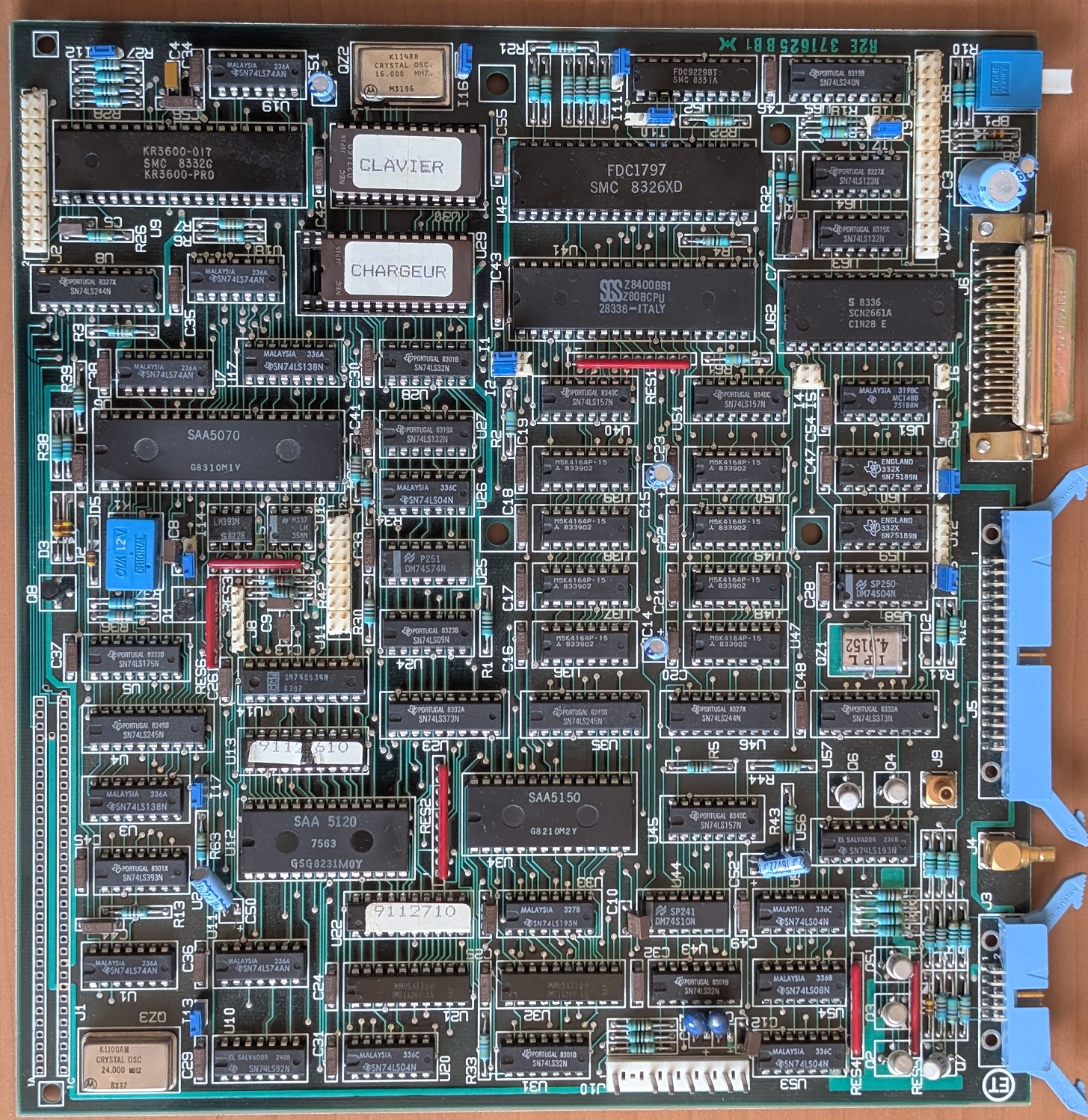
Chips:
| Marking | Manufacturer | Reference | Role |
|---|---|---|---|
| U41 | SGS | Z8400BB1 | Z80 B CPU (goes up to 6 MHz) |
| U42 | SMC | FD1797 | Floppy Controller |
| U62 | Philips | SAA5070 | Multifunction |
| U6 | SMC | KR3600-017 | Keyboard Controller |
| U12 | Philips | SAA5120 | Not sure, Videotext related |
| U34 | Philips | SAA5150 | Not sure, Videotext related |
| U62 | Signetics | SCN2661A | UART |
| U52 | SMC | FDC9229BT | Floppy interface |
| U24-27, U36-39 | Mitsubishi | M5K4164P-15 | 64k x 1 DRAM |
| U21, U32 | INMOS | IMS1420P55 | 4k x 4 SRAM, for video |
| U13 | National Semi | DM74S472AN | “9112610”, 4k PROM, for addressing? |
| U22 | Signetics | N82S147AN | “9112710”, 4K PROM, for addressing? |
| U29 | NEC | D2716D | 2K x 8 Boot ROM |
| U30 | NEC | D2716D | 2K x 8 Keyboard ROM |
Notable parts:
- QZ1: 4.9152 MHz quartz
- QZ2: 16 MHz quartz
- QZ3: 24 MHz quartz
- K1: Little 12V relay
- There are two 75189 RS-232 buffers but only one 75188
Note: U29 is in a 28 pin socket, which might accept 2764 ROM chips.
Connectors:
| Marking | Type | Pins | Role |
|---|---|---|---|
| J1 | N/A | 2 * 32 | Unpopulated, Role unknown |
| J2 | HE10 | 26 | Keyboard interface |
| J3 | HE10 | 10 | Video out, Peritel |
| J4 | SMB | 2 (coax) | Video out, Composite |
| J5 | HE10 | 36 | Printer |
| J6 | SUB-D | 25 | Serial/V24, female connector |
| J7 | HE10 | 34 | Floppy |
| J8 | HE10 | 5 | Cassette, goes to DIN-5 |
| J9 | SMB | 2 (coax) | Video to monitor |
| J10 | 3.96? | 7 keyed | Power input, with a key |
| J11 | HE10 | 20 | Modem |
| J12 | HE10 | 5 | Unknown, maybe serial |
There’s a dozen jumpers too.
Boot Monitor
The boot monitor initializes hardware, runs basic self test then shows a prompt.
If the autotest succeeds, it will show AUTO-TEST : OK.
Otherwise it will be AUTO-TEST : followed by error codes:
- 0: Video RAM
- 1: Main RAM
- 2: FDC
- 3: Serial
- 4: Timer
Prompt commands:
CR: default boot (drive 0)B<drive>,<sector>: boot drive,sector*: transparent terminal, prints typed characters. PressESCto exitG<address>: execute at address (hex)M: memory submenuD<start>,<end>: hex dump memory range (16 bytes/line)M<addr>: modify memory byte-by-byte (’.’ to quit)I<port>: read and display I/O port valueO<port>,<value>: write byte to I/O portG<addr>: execute at addressR: return to main prompt
Notes:
- All the commands should be typed in caps. Lower case characters do not work.
- These were obtained through automated disassembly and have yet to be confirmed.
Disassembly is available here: https://github.com/fstark/micral-p2
Power Supply
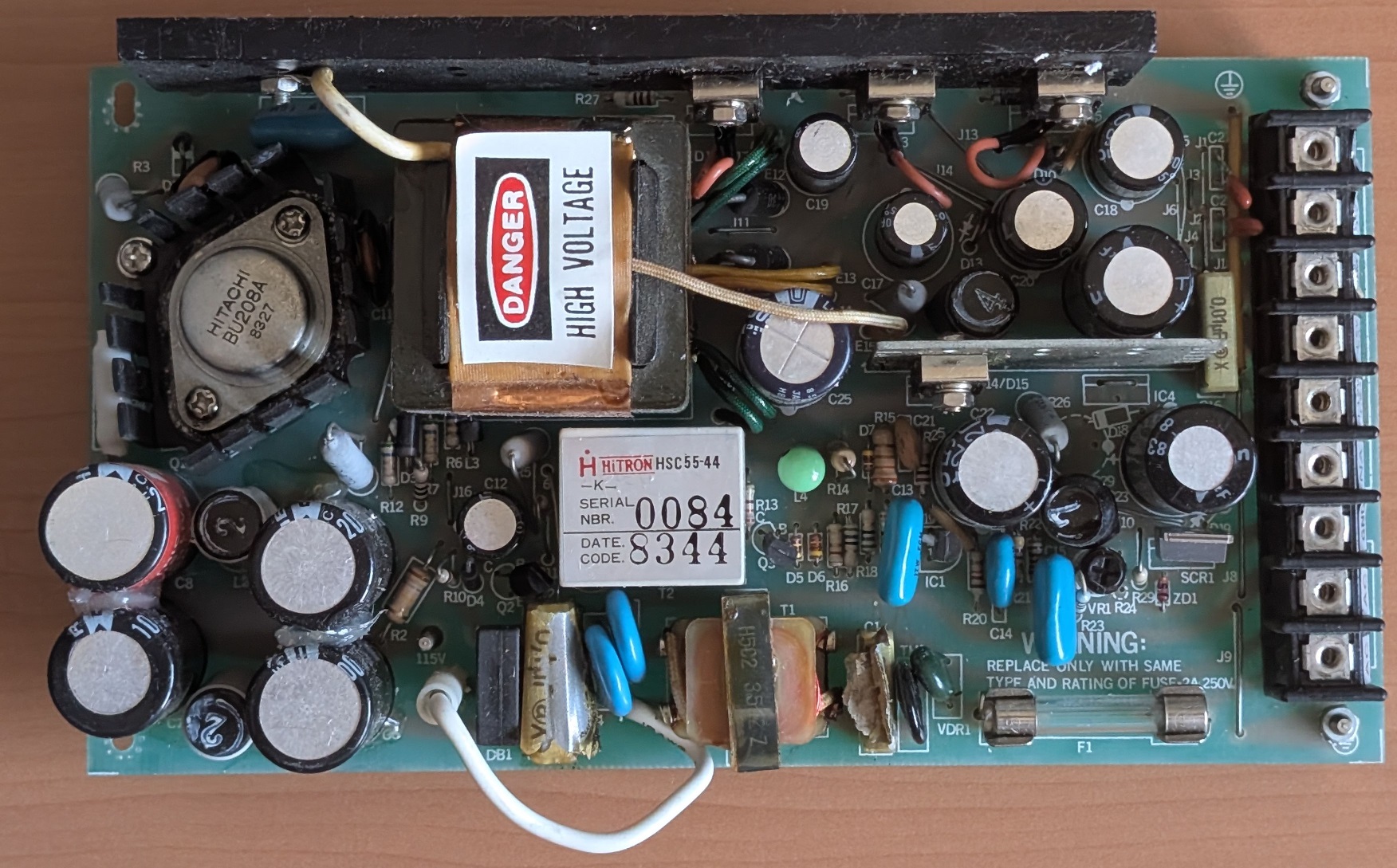
Made by HiTRON, model HSC55-044. It’s probably a custom order for Bull, as mine has a #0084 serial.
It works fine but 2 filtering caps made by RIFA exploded a long time ago. The smell lingers… The heatsink as a greased back, but it doesn’t touch anything in the chassis except for my fingers during disassembly.
Output voltages:
- 12V 3A
- 5V 5A
- -12V 0.2A
Fuses:
- F1: 250V 2A fast blow, 30mm long
Filtering capacitors:
| Marking | Brand | Reference | Value | Class | Length | Width | Lead pitch |
|---|---|---|---|---|---|---|---|
| C1 | RIFA | PME271M510 | 0.1 µF | X2 | 24mm | 5mm | 20mm |
| C2 | RIFA | PME271M510 | 0.01µF | X2 | 18mm | 5mm | 15mm |
| C16 | RIFA | PME271M610 | 0.01µF | X2 | 18mm | 7.5mm | 15mm |
To-Do
- Weight
- Measurements
- Modem, keyboard
- Motherboard
- Document jumpers
- Pinouts
- Check PAL/GAL references and dump them
- Video
- Display size and characteristics (columns, lines)
- Is there a bitmap mode?
- Floppy
- Dump & upload CP/M disk
- Document geometry